I check the weather every morning. Not because I am obsessed with meteorology but because I surf, and surfing is basically a continuous negotiation with the ocean about whether today is the day. Standard weather apps give you a temperature and a cloud icon. Dark Sky was the closest thing to useful before Apple killed it. Everything else is either a data dump for weather nerds or a stripped-down widget that tells you almost nothing.
So I built Aura. It is a weather app for people who actually care about the conditions — surfers, runners, cyclists, anyone with outdoor plans that depend on more than "partly cloudy, high of 68." The core thesis: instead of showing you everything and making you interpret it, use AI to synthesize the data into a plain-English summary that tells you what you actually need to know.
Here is how it came together.
The Problem With Weather Apps
Weather data is not the bottleneck. Open-Meteo provides free access to incredibly detailed forecasts: hourly temperature, wind, precipitation probability, UV index, soil moisture, marine conditions, air quality, pollen counts, ensemble model predictions. The data is there. What is missing is the translation layer.
When I am about to paddle out, I do not need to know the atmospheric pressure in hectopascals. I need to know whether the swell is overhead, whether the wind will hold offshore through the morning session, and whether the tide is going to make the spot work or shut it down. A weather app that shows me all the raw numbers is not actually helping me. It is outsourcing the thinking.
The second problem is fragmentation. Checking surf conditions requires three different apps: a weather app, a surf forecast app, and a tide app. Then separately checking air quality if you have asthma, pollen if you have allergies. Aura is one app that surfaces all of it, in context.
The Stack
The architecture is simple by design.
Backend: FastAPI running on Railway. Python was the right call here because the data processing — aggregating multiple APIs, running quality ratings, building the prompt context for the AI summaries — is cleaner in Python than in TypeScript. Railway handles deployment automatically on every git push via a Dockerfile, which means no manual deploy steps.
iOS App: SwiftUI with iOS 18. I wanted the app to feel native and fast, which meant building it properly in Swift rather than trying to wrap a web view. SwiftUI's newer APIs make complex layouts tractable in a way that UIKit never did.
Data Sources:
- Open-Meteo for weather, air quality, and marine data (free, no API key required for basic use)
- OpenWeatherMap for radar map layers
- Anthropic's Claude API for the AI-generated weather summaries
The backend acts as an aggregation layer — the iOS app hits a single endpoint per view, and the backend handles fan-out to the underlying data sources, error handling, and caching.
How the Data Flows
Every screen in the app maps to a backend endpoint.
GET /v1/forecast?lat=&lon=    → Current conditions + hourly + 7-day
GET /v1/air-quality?lat=&lon= → AQI + pollutants + 6 pollen types
GET /v1/marine?lat=&lon=      → Wave height + period + surf rating
GET /v1/summary?lat=&lon=     → AI-generated plain-English summary
GET /v1/alerts?lat=&lon=      → Active weather alerts
GET /v1/radar/layers          → Map layer metadata
The summary endpoint is where the interesting work happens. The backend fetches the current forecast, air quality, and marine data, formats all of it into a structured prompt, and sends it to Claude. The model returns a short paragraph that reads like something a knowledgeable person would tell you — not a list of stats, but an actual synthesis. "Morning sessions will be good. Waist-to-chest high, light offshore wind until noon, then it goes onshore. Air quality is fine but pollen is elevated if you have grass allergies."
That one feature is what makes the app feel different from everything else in the App Store.
Building the iOS App
The app is organized around a tab bar with five sections: Home, Forecast, Radar, and two premium-gated tabs for Air Quality and Marine conditions.
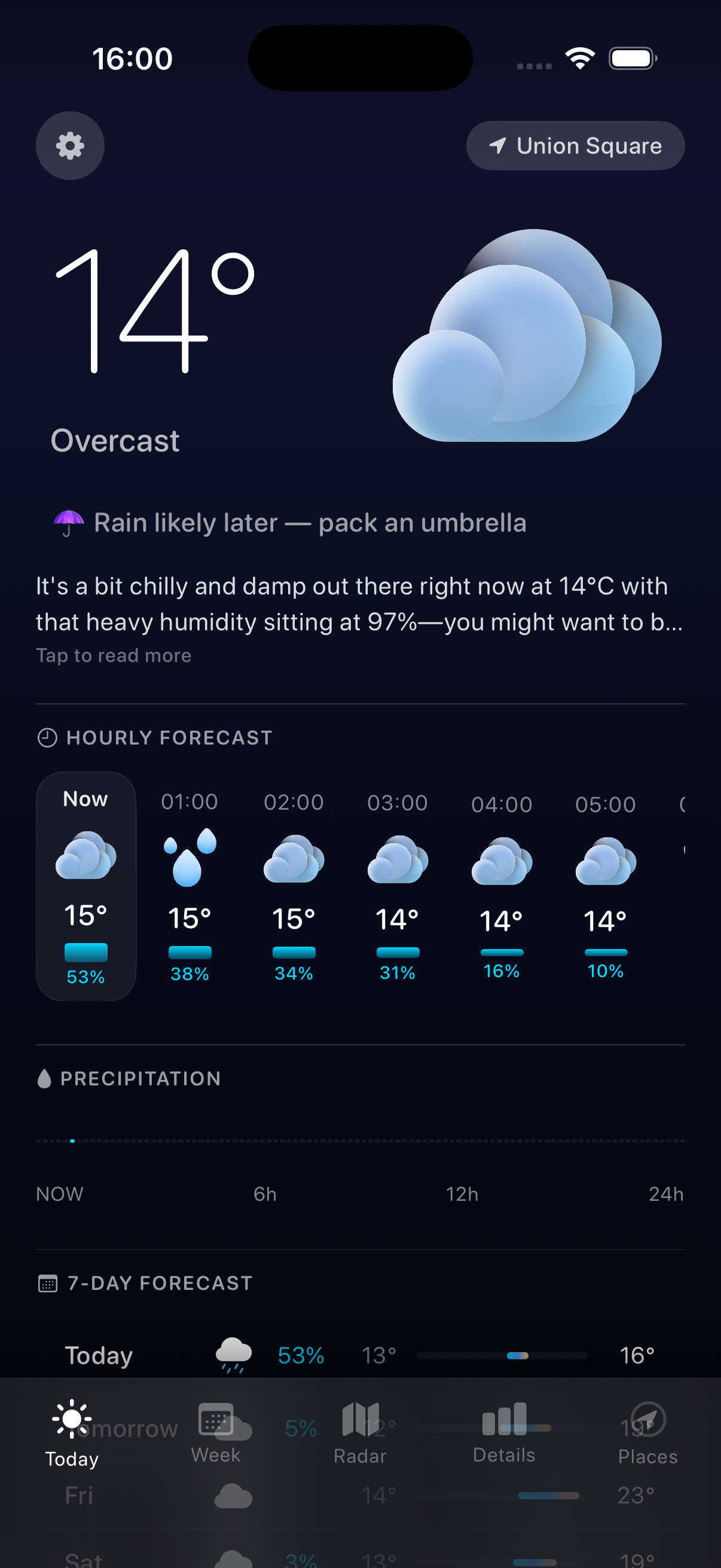
The Home screen is the most important view to get right. It needs to communicate the current conditions at a glance while surfacing the AI summary without making it feel like an afterthought. The design hierarchy I landed on: location and current temp at the top, the AI summary card below it, then the hourly timeline, then quick-access cards for the data that matters most.
The WeatherViewModel handles all the data fetching and state management. It uses Swift's structured concurrency — async/await throughout, with withTaskGroup for parallel API calls where screens need data from multiple endpoints simultaneously.
func fetchWeatherData(for location: CLLocationCoordinate2D) async {
    await withTaskGroup(of: Void.self) { group in
        group.addTask { await self.fetchForecast(location) }
        group.addTask { await self.fetchAirQuality(location) }
        group.addTask { await self.fetchSummary(location) }
    }
}
This matters for perceived performance. The home screen data arrives in parallel rather than sequentially, so the UI fills in quickly rather than loading one piece at a time.
The Forecast View
The Forecast view shows the 7-day forecast for free users and extends to 15 days with ensemble models for premium subscribers. Ensemble models are what meteorologists actually use for medium-range forecasting — instead of a single deterministic forecast, you run the model dozens of times with slightly varied initial conditions and look at the spread. A tight spread means high confidence. A wide spread means the atmosphere is chaotic and nobody really knows.
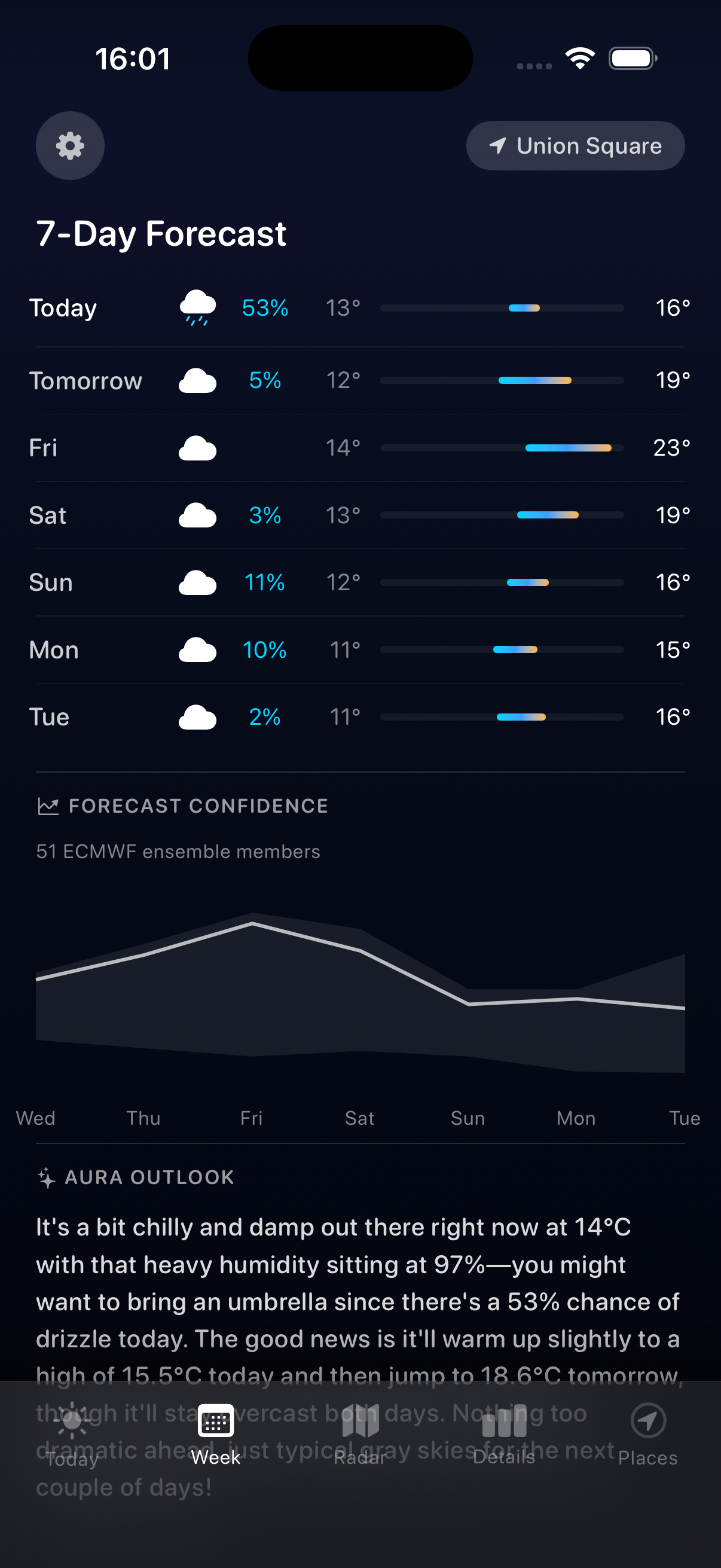
Showing ensemble uncertainty to general users is a design challenge. Most people do not know what ensemble models are, and showing error bars on a forecast would just confuse them. The approach I landed on: show the most likely outcome as the primary forecast, and add a confidence indicator (high / moderate / low) that is derived from the ensemble spread but expressed in plain language.
Air Quality and Pollen
This is the feature I am most personally invested in. I have grass allergies, and I want to know before I go outside whether I am going to spend the rest of the day with itchy eyes. Standard weather apps either ignore pollen entirely or show a single "pollen count" number with no context.
Aura tracks six pollen types separately: grass, tree, birch, oak, ragweed, and mugwort. Each one has its own seasonal pattern and different severity for different people. The air quality view shows current AQI broken down by pollutant (PM2.5, PM10, NO2, O3, SO2, CO) alongside the pollen data.
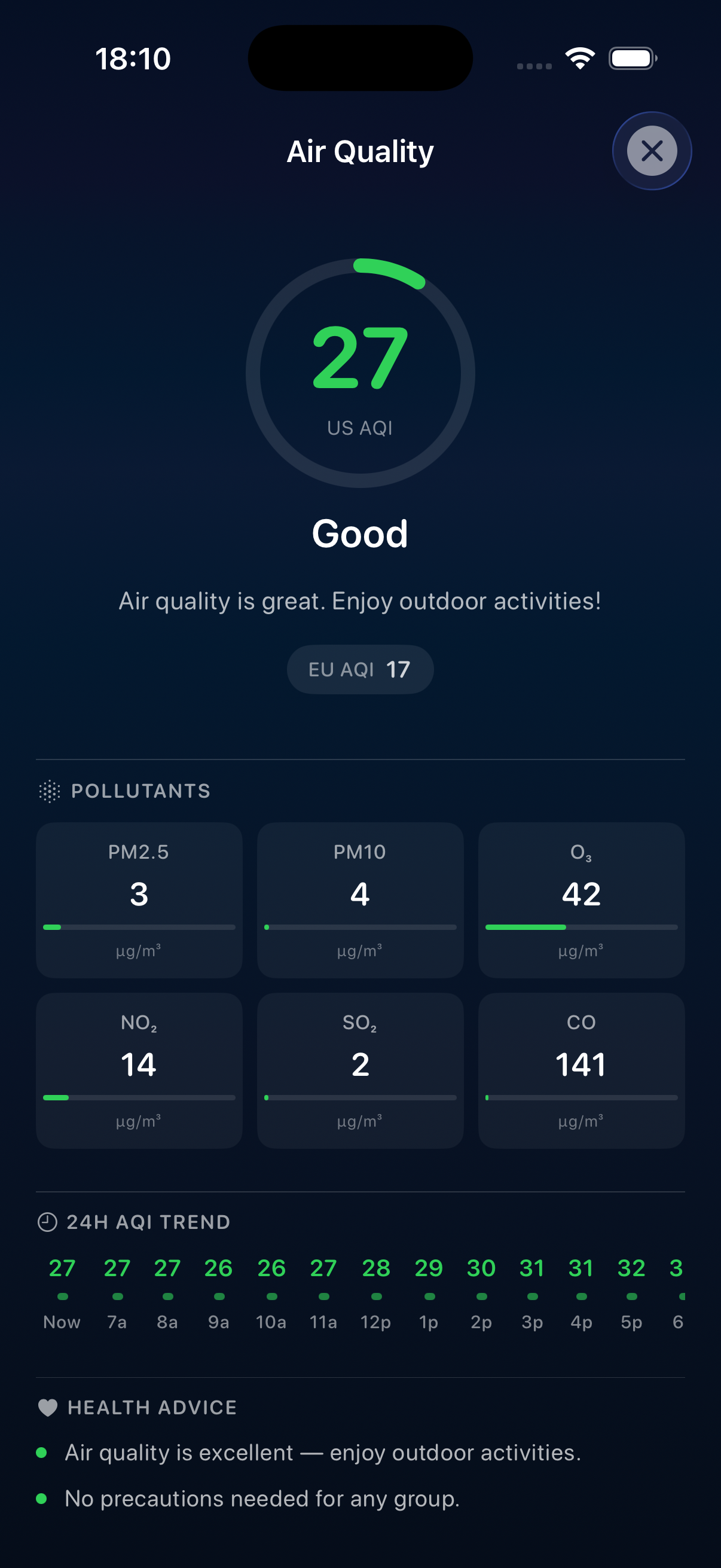
The data comes from Open-Meteo's air quality API, which uses the CAMS (Copernicus Atmosphere Monitoring Service) model. It is genuinely good data — the same data that European air quality monitoring organizations use. The challenge was presenting it clearly. The final design uses color-coded severity bands and plain-language descriptions rather than raw numbers.
The Surf and Marine View
This is the reason I built the app. The marine endpoint hits Open-Meteo's marine API and returns wave height, wave period, wave direction, swell height and period, wind waves, and current water temperature. The backend processes this into a surf rating (poor / fair / good / excellent) based on a simple heuristic model that weights wave height and period while penalizing high wind speeds and poor swell direction.
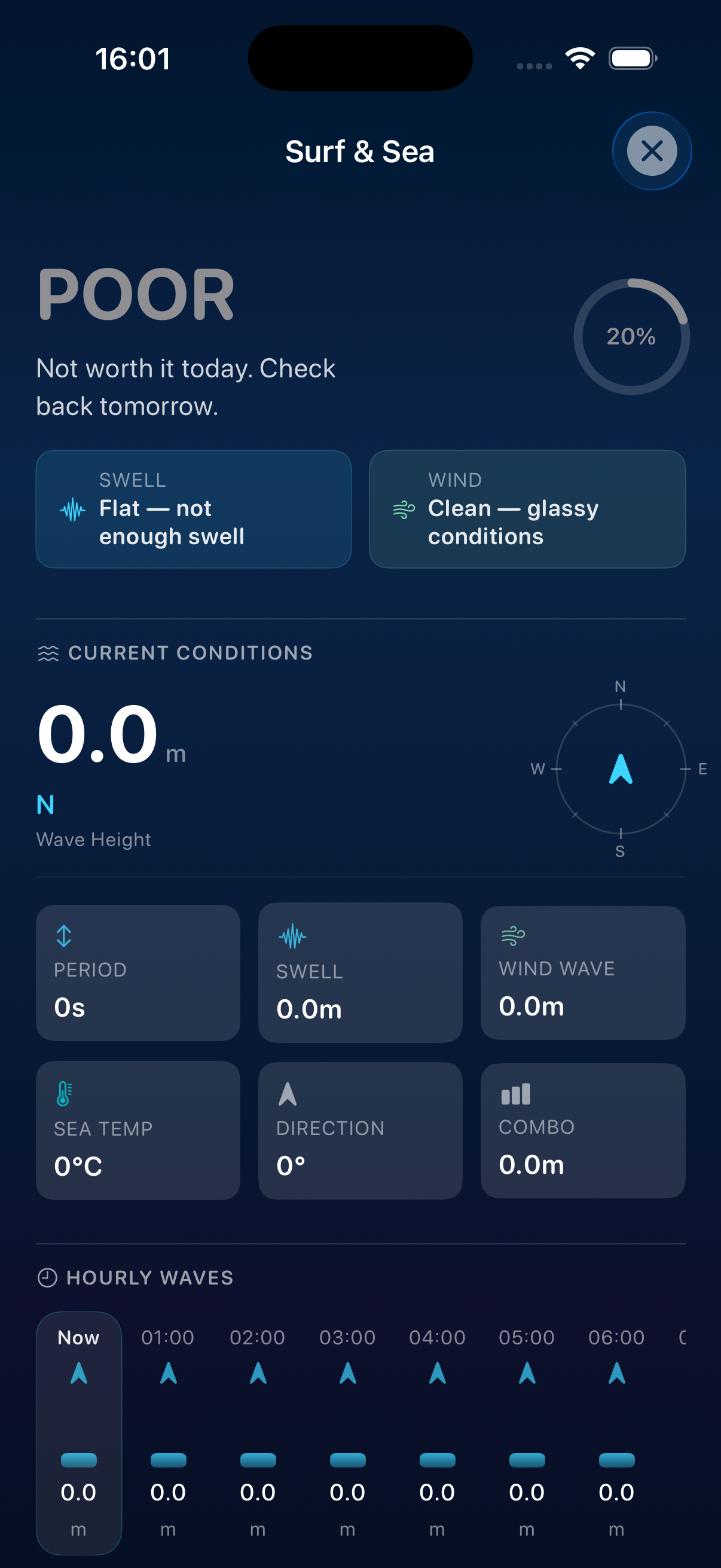
The surf view also shows nearby surf spots — this uses a static database of known breaks with their coordinates and orientation, ranked by proximity to the user's location. For each spot, the app evaluates how well the current swell and wind direction align with that spot's optimal conditions.
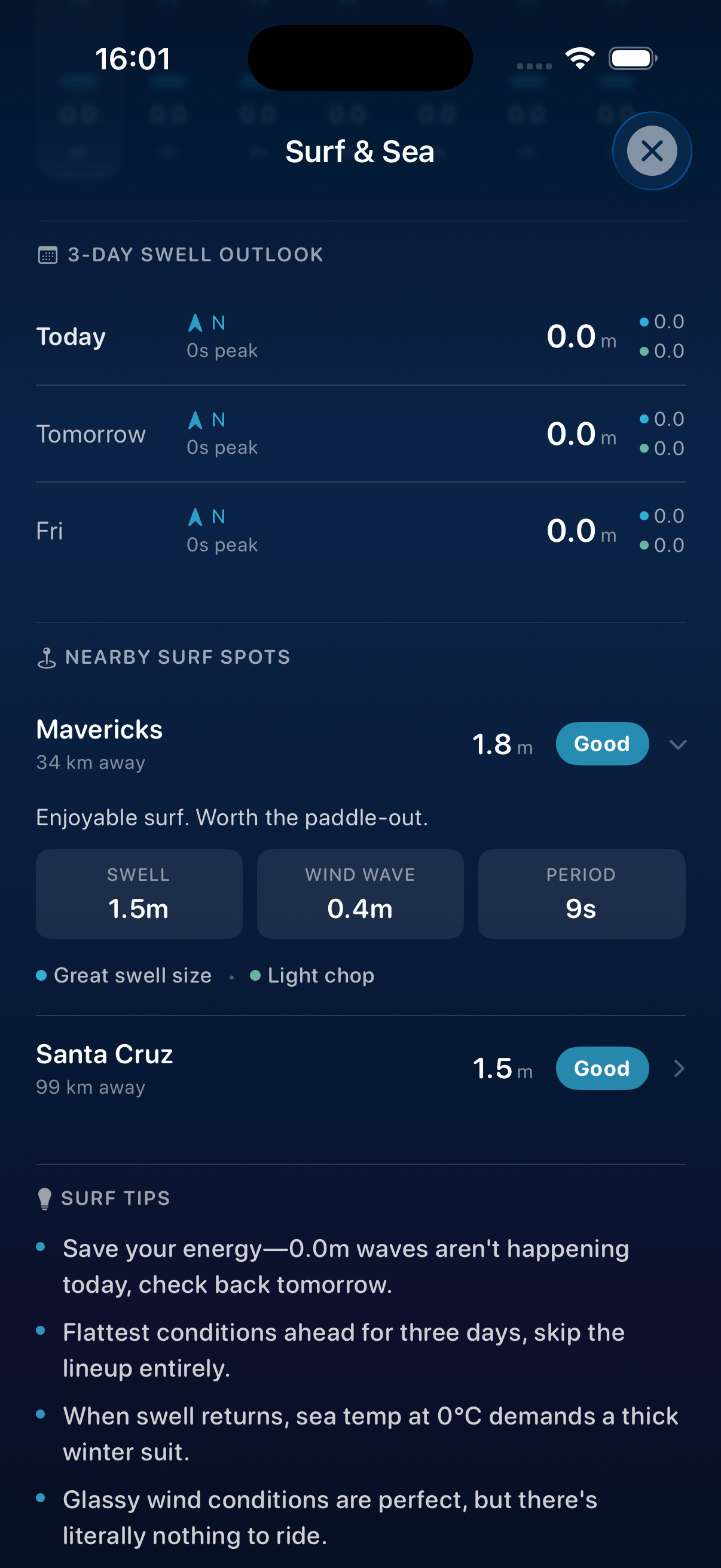
The marine view is premium-gated, along with pollen detail, ensemble forecasts, and the AI summary feature. The freemium split was a deliberate decision: the core weather functionality (current conditions, 7-day forecast, precipitation radar) is free and genuinely useful. The premium features are the ones that require either the backend AI infrastructure or the more specialized data sources.
The Radar View
The radar view uses OpenWeatherMap's map tile layers rendered on top of a native MapKit map. Users can toggle between precipitation radar, wind speed, temperature overlay, and cloud cover. The layer rendering is handled with a MKTileOverlay subclass that fetches tiles from the OpenWeatherMap API with the appropriate API key injected.
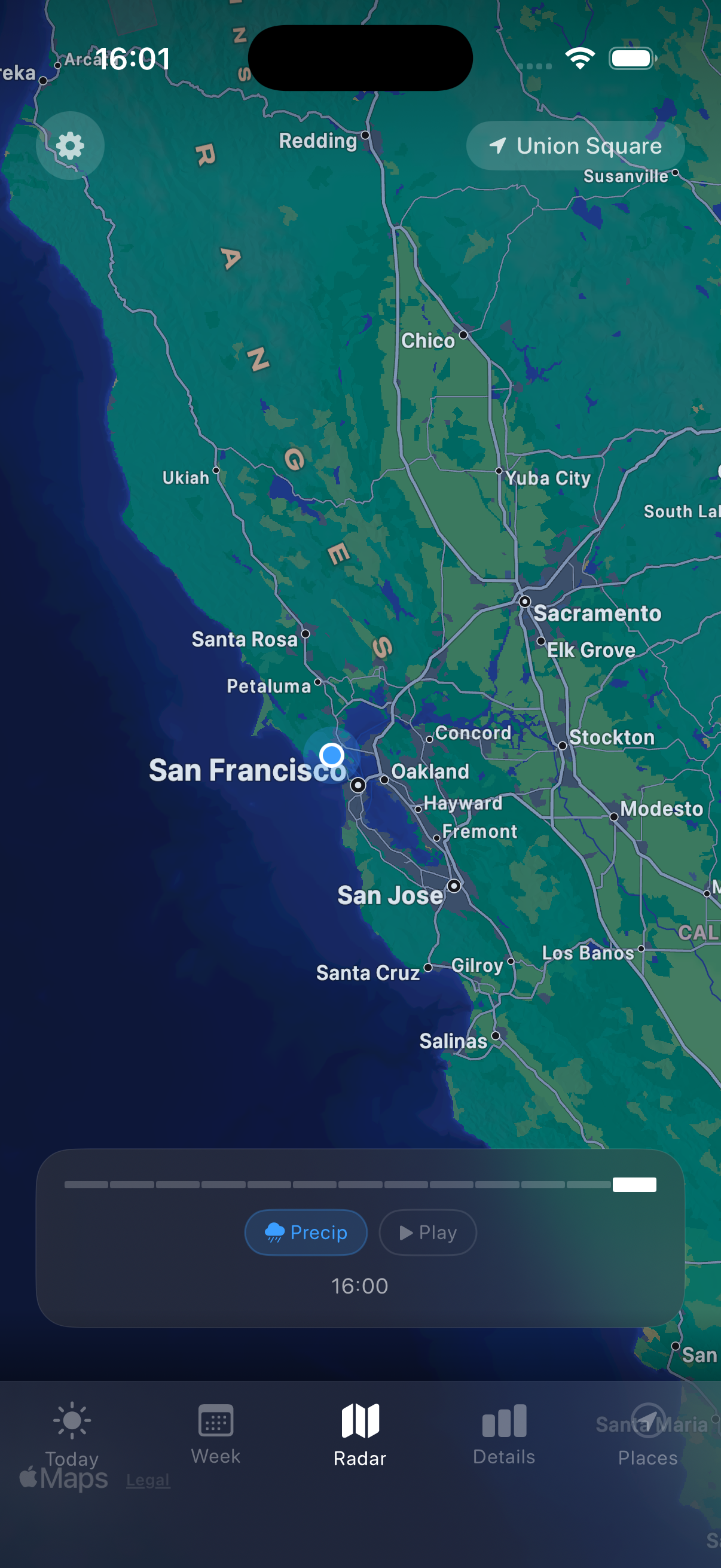
This view is free. Radar is table stakes for a weather app, and restricting it to premium would feel hostile.
The Premium Model
The subscription is $19.99 per year with a 7-day free trial. I implemented it with StoreKit 2, which is Apple's current in-app purchase framework and is significantly cleaner to work with than the legacy StoreKit.
The PremiumManager is a singleton that observes transaction updates and maintains a isPremium published property that the rest of the app reads. Premium feature gates are implemented with a PremiumLockOverlay view modifier — wrap any view in it and it shows a paywall prompt when the user is not subscribed.
MarineDetailView()
    .premiumLocked(feature: "Surf & Marine")
This pattern keeps the gate logic out of the feature views themselves. The views just render their content. Whether that content is visible depends on the overlay.
What the Backend Does That the App Cannot
The backend is not just a proxy. It does real work that would be wrong to do on-device.
First, it aggregates and normalizes data from multiple sources into a consistent schema. The iOS app does not need to know that wave data comes from Open-Meteo marine API and radar tiles come from OpenWeatherMap. It just knows the response shape.
Second, it runs the prompt engineering for the AI summaries. Prompts are code. They need to be iterable without requiring an app store update. Having the prompt logic in the backend means I can improve the summaries without shipping a new iOS binary.
Third, it handles rate limiting and caching. Open-Meteo is free but has rate limits. The backend caches responses for 10 minutes by location, which reduces API calls significantly when multiple users are querying the same area.
What I Would Do Differently
The backend is on Railway. That works fine, but if I were starting fresh I would look at Fly.io more seriously — Railway's pricing scales awkwardly for apps with bursty, location-dependent traffic patterns.
The surf rating heuristic is too simple. It works for beach breaks in consistent swell conditions but misses nuance for reef breaks, point breaks, and tide-sensitive spots. A better model would take break type and tidal influence into account. This is on the roadmap.
The AI summary prompt took more iteration than I expected. The first versions were too verbose, too formal, and sometimes hallucinated conditions that were not in the input data. The current prompt has explicit instructions to stay grounded in the provided data, use a specific tone, and keep summaries under 80 words. Getting that right required probably 30 iterations.
The Honest Version
Building a weather app is one of those projects that looks simple until you start. The data layer is genuinely complex — not because any single API is hard to use, but because aggregating multiple async data sources, handling failures gracefully, and keeping the UI responsive while all of this is happening requires careful architecture.
The AI summary feature is the part that makes the app actually different from what already exists. But it only works because the data feeding it is structured correctly. The model cannot synthesize conditions it does not have access to, and it cannot avoid hallucinating if the prompt context is ambiguous.
The stack I landed on — FastAPI backend, SwiftUI frontend, Claude for summaries — is boring in all the right ways. Each piece does its job clearly. The interesting work is in the layer between them: what data to pass, how to structure it, and how to present the output in a way that is actually useful.
Aura is pending App Store submission. If you surf, run, or just want a weather app that gives you a straight answer, it is coming soon.